






The “best” cell phone for a senior in 2026 is not just about big buttons anymore. It’s about the intersection of capability and safety.
Today’s best options range from locked-down caregiver phones for dementia to full-featured smartphones with simplified “senior modes,” spam controls, emergency calling features, and accessibility settings for vision and hearing.
Whether you’re a “silver surfer” who wants the latest iPhone or a caregiver supporting someone with cognitive decline, the hardware and software have finally caught up to the real-world needs.
According to Pew Research Center, smartphone ownership among people 65+ continues to rise, but the type of device matters more than ever.
At a Glance: The 2026 Senior Phone Matrix
| Model | Best For… | Why It Wins | Typical Cost |
|---|---|---|---|
| RAZ Memory Cell Phone | Dementia / Alzheimer’s | Caregiver controls, whitelist calling, simplified “no-confusion” interface | Mid-range device price + service |
| Apple iPhone (with Assistive Access) | Active seniors, Apple family | Best “simplified mode” on a real smartphone, plus strong safety ecosystem | Premium |
| Samsung Galaxy A-series (Easy Mode) | Android value + big screen | Large displays, strong contrast, good accessibility, good prices | Budget to mid-range |
| BlindShell Classic 3 | Severe vision impairment | Tactile buttons + voice-first UI designed for low/no vision | Specialty (usually high) |
| Consumer Cellular IRIS Easy Flip | Budget + simplicity | Flip phone basics with hearing-aid compatibility and simple menus | Low |
Best for Cognitive Support (Dementia & Alzheimer’s)
1. RAZ Memory Cell Phone
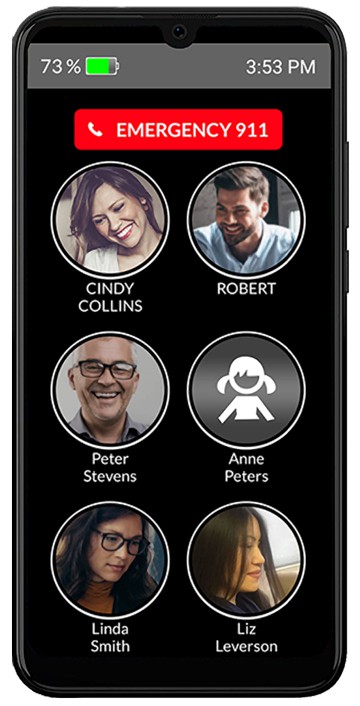
For memory loss, a normal smartphone can turn into a daily anxiety machine. The RAZ Memory Cell Phone is built to reduce confusion and prevent common failure points:
no cluttered app grids, no “where did my keypad go?” moments, and far fewer ways to get lost.
The interface is intentionally simplified and designed around calling trusted people.
Caregivers can set it up so the user taps a photo to call, without navigating a traditional dialer or menus.
Why caregivers like it: The RAZ caregiver tools are the real product. They can help you:
- Block scams: Use a whitelist-style setup so only approved contacts can get through.
- Reduce repetitive calling: Set “quiet hours” and limits that match real routines (especially sundowning patterns).
- Check status remotely: Monitor basics like battery level and location, which is often what you actually need day-to-day.
- Keep it stable: The point is fewer surprises, fewer “updates,” and fewer accidental taps.
If you’re trying to support someone with dementia, this category is different from “senior-friendly smartphones.”
The right question is: Do we need simplicity and control more than flexibility?
If the answer is yes, RAZ is hard to beat.
Best for Vision & Hearing Challenges
1. BlindShell Classic 3 (Vision-first phone)
For severe vision impairment, touchscreen phones can be a barrier. BlindShell Classic 3 is built around tactile navigation and voice feedback.
It’s not trying to be a normal smartphone. It’s trying to be reliably usable every single day.
- Tactile keypad: Buttons you can feel, not guess.
- Voice guidance: Spoken confirmation helps prevent “menu drift.”
- Voice control: Useful when dexterity is also an issue.
2. Google Pixel smartphone (Hearing accessibility powerhouse)
If hearing support is the priority and the user can handle a mainstream smartphone, the Google Pixel line is one of the best all-around choices for accessibility.
Features like live captions, transcription, and sound-related alerts can be genuinely life-improving for people who are deaf or hard of hearing.
3. Kyocera DuraXV Extreme+ (Very loud, very rugged flip phone)
If the goal is “a flip phone that you can actually hear,” the Kyocera DuraXV Extreme+ is a strong option.
It’s also built to survive drops, water, dust, and general chaos.
Best Smartphones for Seniors (Active and Tech-Comfortable)
1. Apple iPhone with Assistive Access
If the senior wants a real smartphone (photos, FaceTime, maps, banking, rideshare), an iPhone paired with Assistive Access is one of the cleanest “simplified mode” setups available.
You can strip the experience down to big, readable tiles and only the apps that matter.
- Bigger, cleaner UI: Large text, simplified layouts, reduced complexity.
- Strong safety baseline: Emergency SOS, Medical ID, location sharing, and family support features.
- Best-in-class support: Apple’s ecosystem is easier for many families to manage together.
Reality check: For true fall detection, the most reliable approach is usually a wearable (like an Apple Watch) paired with the phone.
2. Samsung Galaxy A-series with Easy Mode (Best Android value)
For Android users who want a big screen without paying flagship prices, Samsung’s Galaxy A-series is often the sweet spot.
Turn on Easy Mode, increase the touch-and-hold delay to reduce accidental taps, and crank up contrast and font sizes.
- Big screens for aging eyes: Better readability without wrecking app layouts.
- Accessibility depth: Strong settings for vision, hearing, and motor control needs.
- Budget-friendly: Often available unlocked and widely supported by carriers.
Best Basic & Flip Phones
1. Consumer Cellular IRIS Easy Flip
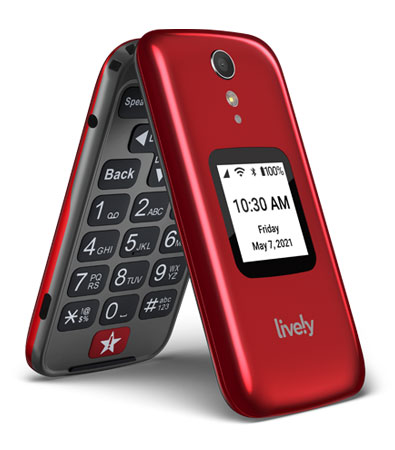
If someone just needs “a phone that phones,” a basic flip phone is still the least stressful option.
The IRIS Easy Flip is popular because it keeps things simple and tends to be budget-friendly.
2. Jitterbug Flip2
The Jitterbug Flip2 is designed for seniors who want tactile buttons and a simple menu, but still want modern help features.
It’s a strong middle ground when a full smartphone is too much.
Tech Translator: How to Explain Data to Your Parents
A major barrier to adoption is vocabulary. If you’re explaining the difference between WiFi and Cellular Data, try this:
- WiFi is like tap water: You use it at home. One monthly bill. Usually “all you can drink.”
- Cellular data is like bottled water: You take it with you. It costs more, and you only get so many bottles each month.
Practical caregiver tip: If someone is accidentally burning data, set up WiFi at home and turn on “WiFi Assist” / “Auto-connect” so the phone prefers WiFi automatically.
Carrier Plans & Economics (2026 Update)
Pricing changes fast. Use these as starting points, then verify the current promos on the carrier site before you buy.
United States
- Consumer Cellular: A common pick for straightforward pricing and U.S.-based support. Plans often start around $20/month for light users.
- T-Mobile 55+: Strong value for seniors who want unlimited data, especially on two-line plans.
- Mint Mobile: Very low-cost entry if you’re comfortable with prepaid and online support. Promos are common, but renewal pricing varies based on term length.
Canada
Important: Cityfone, SimplyConnect, and Zoomer Wireless ended service on December 31, 2024.
If you’re supporting a senior who was on one of those brands, confirm what they were migrated to and whether their plan still makes sense.
- TELUS Mobility for Good® (Seniors):
A critical option for low-income seniors receiving GIS. Offers low-cost plans and device support (eligibility required).
⚠️ Important: The “Unlocked Phone” Network Warning
If you’re buying a phone from a third-party marketplace (Amazon, eBay, Facebook Marketplace), be careful.
Many older “unlocked” phones still power on and look fine, but may not support modern voice calling on your carrier.
Minimum checklist before you buy:
- 4G LTE support (not just “3G/4G” marketing fluff)
- VoLTE / HD Voice compatibility on your specific carrier
- Carrier compatibility check (most carriers have an online IMEI checker)
If the phone doesn’t support VoLTE properly, it can become a very expensive paperweight, especially as legacy networks continue to disappear.
How to Lower Your Cell Phone Costs
In the U.S., low-income households may qualify for discounts through the government Lifeline program.
Eligibility is generally based on income or participation in specific assistance programs.
In Canada, check carrier social-impact programs (like Mobility for Good) and any provincial or community supports that help seniors stay connected.
Get Connected
The senior phone market in 2026 is finally about matching the device to the stage of life.
For dementia, caregiver-controlled simplicity beats features. For active seniors, a modern smartphone with a proper simplified mode is usually best.
Pick the phone that reduces friction, increases safety, and keeps the person connected without turning daily life into tech support.
* Pricing and availability change quickly. Last reviewed: December 2025.